SFTP or SCP fails over SSH
sftp scp not working becomes manageable when the investigation identifies the last successful SSH boundary before changing configuration.
TL;DR: Interactive SSH works, but file transfer fails because its subsystem, path, permissions, shell output, or protocol assumptions differ. Confirm the effective target and platform layer first. Test SFTP directly, confirm the effective subsystem, inspect the target path as the login user, and choose a transfer destination the account actually owns.
Audience: developers, founders, homelab users, and on-call operators with basic command-line familiarity. Read every command, replace example names, and keep a recovery path before changing access.
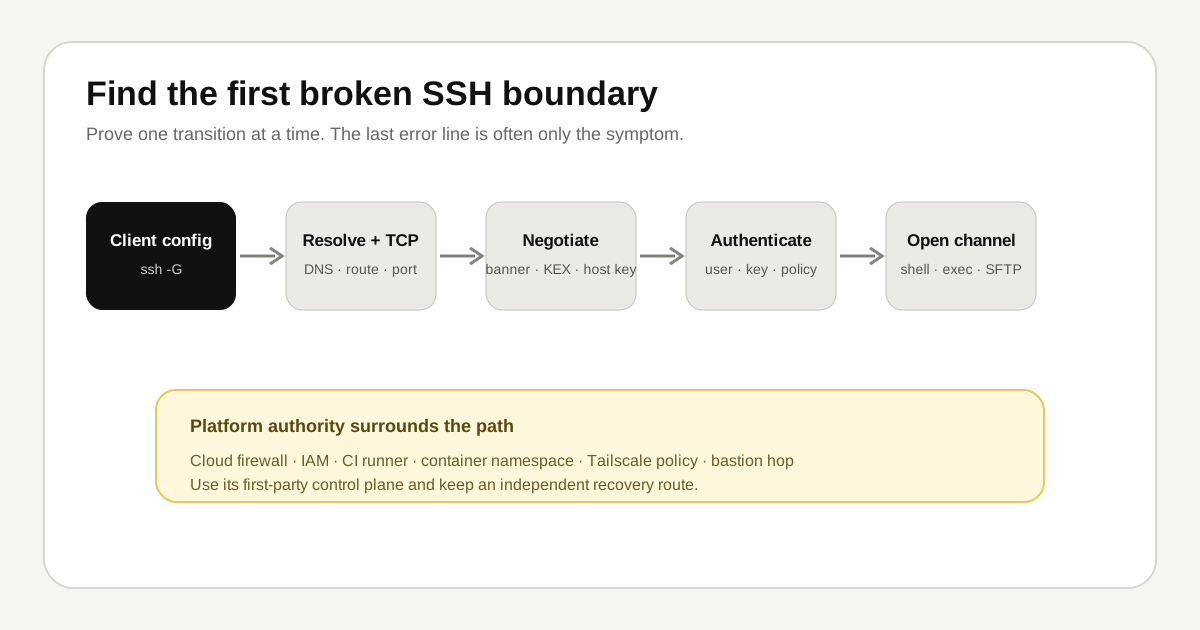
What sftp scp not working means
Interactive SSH works, but file transfer fails because its subsystem, path, permissions, shell output, or protocol assumptions differ.
SSH crosses name resolution, TCP transport, protocol negotiation, host verification, user authentication, channel creation, and the remote program. Record the last stage that succeeded and the first line that contradicts the expected path.
Read-only diagnostic path
Run these from the same account and network that sees the problem:
sftp -vvv user@example-host; ssh user@example-host 'pwd; id; command -v sftp-server'; sshd -T | grep -i subsystem; stat -c '%a %U %G %n' /target/pathRecord the UTC time, target, exit status, and first decisive line. Do not paste private keys, passphrases, tokens, complete environment dumps, or unredacted authentication logs into a shared transcript.
Interpret the evidence
- Authentication success proves only the connection and account, not target-directory write access.
- SFTP needs a configured subsystem; modern SCP commonly uses SFTP under the hood.
- Unexpected shell startup output can break older SCP protocol behavior.
- A chroot changes which paths and binaries the session can see.
- If two observations conflict, trust effective runtime state and the narrow timestamped log over a remembered configuration file.
If two observations conflict, effective configuration and timestamped runtime evidence outrank a remembered file. A successful client-side check does not prove that a server, identity provider, cloud firewall, or second SSH hop agrees.
Choose the platform boundary
Linux distributions, macOS, Windows, WSL, cloud VMs, containers, CI runners, VS Code, Tailscale, NAS appliances, and bastions expose different authorities and recovery routes. Use the SSH platform diagnostics guide for the relevant environment instead of applying every platform command to one host.
Decision tree
- Confirm the target. Expand the SSH configuration and verify the hostname, address, port, and user. A correct command aimed at the wrong machine is still dangerous.
- Locate the failure stage. Use verbose client output once. Stop at the first decisive error rather than interpreting every debug line as a problem.
- Compare with server evidence. If you have console or an existing session, read a tight log window around one reproduction attempt.
- State one hypothesis. Name the observation that would disprove it. This prevents a plausible story from becoming an untested conclusion.
- Choose the smallest reversible repair. Test SFTP directly, confirm the effective subsystem, inspect the target path as the login user, and choose a transfer destination the account actually owns.
- Verify from a second session. Keep the recovery path open and repeat the original user action, not merely a local status check.
Repair and rollback
Before any change, save the current effective setting or file metadata, write down the rollback, and keep an existing SSH or provider-console session open. Validate sshd configuration with the platform-supported test command before reload. Prefer reload over restart when the service and change allow it.
The key caution for this failure is: Avoid making shared directories world-writable to bypass a file-transfer error. Use an independent recovery path when the network path is unavailable. A repair is complete only when a new connection works from the user's original network and the old access path is intentionally closed.
Do not bundle cleanup into recovery. Rotating every key, upgrading the host, rewriting the firewall, and changing DNS at once creates four new explanations. Restore the narrow capability, confirm it, then schedule hardening as a separate reviewed change.
Investigate it in Tryssh
$ ssh -G example-host | sed -n '1,24p'
Capture the first decisive result, timestamp, and exit status.
Tryssh separates the copilot's SSH execution channel from the visible terminal. Read-only commands must pass a default-deny risk gate; state-changing commands remain explicit human approvals. That helps organize evidence, but it does not make Tryssh the incident owner or remove the need for independent recovery.
Common operator questions
Can Tryssh fix this automatically?
Tryssh can gather and explain safe evidence, but it should not silently change authentication, firewall, routing, or service state. It proposes consequential commands for review so the person responsible for the host keeps control of blast radius.
Should I restart SSH first?
Usually not. A restart can erase useful state or lock out the only session. Capture effective configuration, service status, and a narrow log window first. If a reload or restart becomes necessary, keep a recovery session open and validate a second login before disconnecting.
What if I do not have console access?
Stop before changing access controls. Establish the provider console, physical access, another administrator, or a tested rollback path. Without one of those, even a correct change can turn a small SSH error into a full lockout.
Evidence and review status
This page consolidates twenty-five platform-targeted drafts into one canonical problem guide. Its commands and claims were checked against the linked upstream and platform sources. Only explicitly labeled reproduced output is presented as first-hand evidence; use the platform guide and current first-party documentation before executing a repair.
Limits and trade-offs
Managed services can replace local SSH files with IAM, metadata, policy, or generated configuration. Verbose output can expose users, hostnames, paths, fingerprints, and topology. A one-host success is evidence, not permission for a fleet rollout; use canaries, stop conditions, bounded concurrency, and independent rollback.
Related Tryssh guides
Continue with SSH multiplexing stale socket, SSH port forwarding not working, the SSH platform diagnostics guide, SSH config guide, and SSH hardening checklist.