SSH platform diagnostics for 25 environments
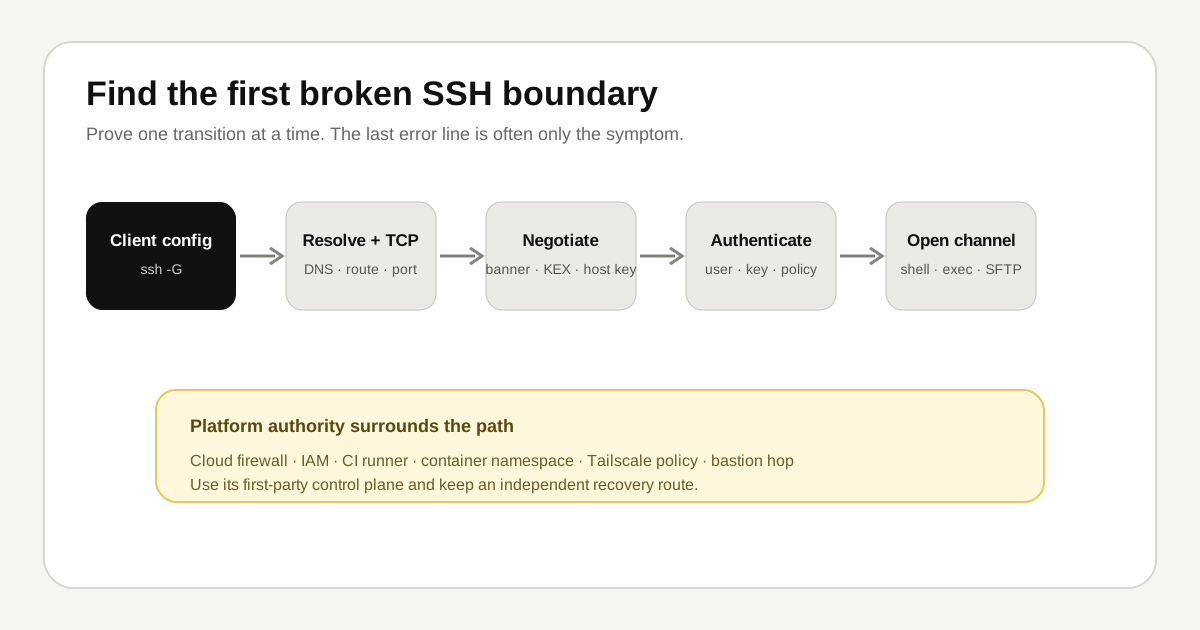
The same SSH error can belong to the client, the server, a cloud control plane, a CI runner, or a second hop. This guide keeps those platform boundaries in one place so problem guides do not repeat twenty-five near-identical introductions.
TL;DR: Start with the problem-specific command, then run the platform check below. A platform check identifies ownership and recovery options; it does not prove the root cause by itself.
Reproduced control
The Tryssh team reproduced the client-side control on macOS 15.7.7 with OpenSSH 9.9p2 on July 28, 2026:
$ ssh -V
OpenSSH_9.9p2, LibreSSL 3.3.6

$ ssh -G tryssh-example | sed -n '1,8p'
host tryssh-example
user hash
hostname tryssh-example
port 22
addressfamily any
batchmode no
canonicalizefallbacklocal yes
canonicalizehostname false
This output proves that ssh -G expands client configuration without opening a network connection. It does not validate a remote host, server configuration, provider policy, or credential.
How to use the platform checks
- Run the problem-specific checks from the canonical troubleshooting guide.
- Run only the relevant platform check below.
- Record the UTC timestamp, hostname, exit status, and first decisive line.
- Use the linked first-party documentation for current service names and recovery paths.
- Keep an independent console or session before changing SSH access.
Platform boundaries and checks
Ubuntu Server
Boundary: An Ubuntu server administered with systemd and OpenSSH packages.
lsb_release -ds; systemctl status ssh --no-pagerCurrent platform authority: Ubuntu OpenSSH documentation.
Debian
Boundary: A Debian host where package defaults and local sshd overrides can both affect the result.
cat /etc/debian_version; systemctl status ssh --no-pagerCurrent platform authority: Debian OpenSSH package documentation.
RHEL
Boundary: A Red Hat Enterprise Linux host where SELinux and firewalld add policy layers.
cat /etc/redhat-release; getenforce; firewall-cmd --stateCurrent platform authority: Red Hat OpenSSH guidance.
Rocky Linux
Boundary: A Rocky Linux server with RHEL-compatible service, firewall, and SELinux behavior.
cat /etc/rocky-release; getenforce; systemctl status sshd --no-pagerCurrent platform authority: Rocky Linux SSH guide.
Alpine Linux
Boundary: A small Alpine host where BusyBox, musl, and OpenRC differ from common Ubuntu examples.
cat /etc/alpine-release; rc-service sshd status; command -v sshdCurrent platform authority: Alpine OpenSSH wiki.
macOS
Boundary: A Mac using Apple's built-in OpenSSH client and Keychain-backed credentials.
sw_vers; ssh -V; ssh-add -lCurrent platform authority: Apple remote login guide.
Windows OpenSSH
Boundary: Windows OpenSSH, where service names, ACLs, paths, and agent behavior differ from Unix.
Get-ComputerInfo | Select-Object WindowsProductName; Get-Service sshd,ssh-agentCurrent platform authority: Microsoft OpenSSH documentation.
WSL
Boundary: A Windows Subsystem for Linux shell with separate Windows and Linux filesystems, agents, and network paths.
uname -a; wsl.exe --status; ssh -VCurrent platform authority: Microsoft WSL networking documentation.
Raspberry Pi
Boundary: A Raspberry Pi that may be headless, Wi-Fi connected, and provisioned from Raspberry Pi Imager.
cat /etc/os-release; hostname -I; systemctl status ssh --no-pagerCurrent platform authority: Raspberry Pi remote access documentation.
AWS EC2
Boundary: An EC2 instance where the guest firewall, security group, route, public address, and selected AMI user all matter.
curl -sS --max-time 2 http://169.254.169.254/latest/meta-data/instance-id; ip routeCurrent platform authority: AWS EC2 connection troubleshooting.
DigitalOcean Droplet
Boundary: A DigitalOcean Droplet with cloud firewall rules, console recovery, and distribution-specific users.
curl -sS --max-time 2 http://169.254.169.254/metadata/v1/id; ip routeCurrent platform authority: DigitalOcean SSH troubleshooting.
Hetzner Cloud
Boundary: A Hetzner Cloud server where cloud firewalls, rescue mode, and the initial root key affect recovery.
curl -sS --max-time 2 http://169.254.169.254/hetzner/v1/metadata/instance-id; ip routeCurrent platform authority: Hetzner server access documentation.
Akamai Linode
Boundary: A Linode instance with Cloud Firewall policy and out-of-band Lish console access.
hostnamectl; ip route; systemctl status ssh --no-pagerCurrent platform authority: Linode SSH troubleshooting.
Azure VM
Boundary: An Azure VM where network security groups, guest firewall rules, and serial console access form separate layers.
curl -sS -H Metadata:true --max-time 2 'http://169.254.169.254/metadata/instance?api-version=2021-02-01'; ip routeCurrent platform authority: Azure SSH troubleshooting.
Google Cloud VM
Boundary: A Compute Engine VM where OS Login, metadata keys, IAM, and VPC firewall rules may replace ordinary authorized_keys.
curl -sS -H 'Metadata-Flavor: Google' --max-time 2 http://metadata.google.internal/computeMetadata/v1/instance/name; ip routeCurrent platform authority: Google Cloud SSH troubleshooting.
Docker host
Boundary: A Linux Docker host where host access must stay distinct from shelling into a container.
docker info --format '{{.ServerVersion}}'; systemctl status docker --no-pager; ss -lntpCurrent platform authority: Docker daemon security documentation.
Kubernetes node
Boundary: A Kubernetes worker or control-plane node where SSH is a break-glass path, not the primary workload interface.
kubectl get nodes -o wide; hostnamectl; systemctl status kubelet --no-pagerCurrent platform authority: Kubernetes node troubleshooting.
Proxmox VE
Boundary: A Proxmox host where a mistaken SSH change can also remove access to the virtualization control plane.
pveversion; systemctl status ssh --no-pager; ip -brief addressCurrent platform authority: Proxmox administration guide.
home lab
Boundary: A home-lab server behind consumer DNS, DHCP, NAT, Wi-Fi, and router port-forwarding.
hostname -I; ip route; resolvectl status; ss -lntpCurrent platform authority: OpenSSH release notes.
NAS
Boundary: A network-attached storage appliance whose vendor UI may regenerate sshd settings during updates.
uname -a; id; df -h; ss -lntpCurrent platform authority: OpenSSH server manual.
GitHub Actions
Boundary: A non-interactive GitHub Actions runner with ephemeral files, masked secrets, and job-scoped environment state.
ssh -V; ssh-add -l; printf '%s\n' "$GITHUB_WORKFLOW $GITHUB_JOB"Current platform authority: GitHub SSH key documentation.
GitLab CI
Boundary: A non-interactive GitLab runner where protected variables, executor type, and known_hosts setup affect SSH.
ssh -V; ssh-add -l; printf '%s\n' "$CI_RUNNER_EXECUTABLE_ARCH $CI_JOB_NAME"Current platform authority: GitLab SSH key documentation.
VS Code Remote SSH
Boundary: VS Code Remote SSH, which opens more than one connection and installs a server component on the host.
ssh -V; ssh -G example-host; code --versionCurrent platform authority: VS Code Remote SSH troubleshooting.
Tailscale SSH
Boundary: Tailscale SSH, where tailnet policy, node identity, posture, SELinux, and ordinary OpenSSH are distinct choices.
tailscale status; tailscale debug prefs; getenforce 2>/dev/null || trueCurrent platform authority: Tailscale SSH documentation.
SSH bastion host
Boundary: A jump-host topology where the client, bastion, target, and two authentication hops must be tested separately.
ssh -G target-via-bastion; nc -vz bastion.example.com 22; date -uCurrent platform authority: OpenSSH configuration manual.
Evidence and limitations
The macOS control above was executed by the Tryssh team. The other commands are source-reviewed diagnostic examples, not a claim that every command was executed on every listed platform. Provider interfaces, package defaults, and service names change; confirm the current first-party source before publishing a measured result or changing production.
Related guides
Start with SSH permission denied (publickey), SSH connection timed out, SSH config not applied, or the SSH configuration guide.