Inspect Linux conntrack pressure before raising the limit
For Linux conntrack table, the safest approach is a bounded operational change, not a command pasted without context. This runbook starts with effective state, shows the smallest candidate action, and finishes by repeating the real user or system path.
TL;DR: Connection tracking records flow state for firewall and NAT decisions; usage, timeout mix, and packet rate explain pressure better than one maximum value. Capture a baseline withsysctl net.netfilter.nf_conntrack_count net.netfilter.nf_conntrack_max, make the reviewed change only when the evidence matches, then verify withsysctl net.netfilter.nf_conntrack_count net.netfilter.nf_conntrack_maxand keep the rollback ready.
Audience: operators who understand IP addresses and ports and can capture bounded network evidence without collecting payloads unnecessarily. This guide assumes familiarity with Linux networking and a change window appropriate to the system.
The direct answer
Count remains below a justified ceiling and insert_failed or drop counters stop increasing under the same load. That is the success condition for Linux conntrack table; command completion by itself is not enough.
The important boundary is name resolution, route selection, neighbor reachability, firewall policy, transport state, and application listener. Connection tracking records flow state for firewall and NAT decisions; usage, timeout mix, and packet rate explain pressure better than one maximum value. If an observation does not identify which side of that boundary failed, collect a narrower observation before changing state.
How the mechanism works
For Linux conntrack table, use this mental model: a connection moves from a name to an address, through route and policy lookup, into a transport socket, and finally to the process bound to the selected address and port. The model prevents a common mistake—treating configuration text, control-plane acceptance, process state, and end-user behavior as the same proof.
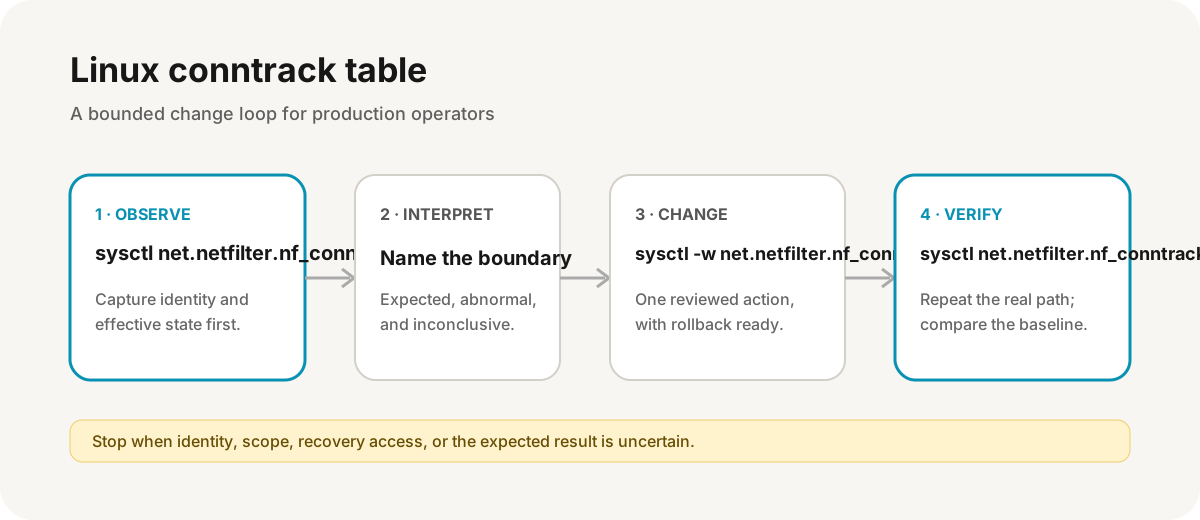
Follow four stages:
- Observe: identify the exact host, object, version, owner, and active configuration.
- Interpret: write the expected result, the abnormal result, and what would remain inconclusive.
- Change: apply one reviewed action at the narrowest layer that contradicts the baseline.
- Verify: repeat the original path and compare the same evidence, including adjacent safety controls.
Preflight and safety boundary
Preserve a second management path before changing routes, resolver state, interfaces, or firewall rules, and redact payloads and private topology from captures.
Before Linux conntrack table, record UTC time, the current version or digest, the exact target, recent changes, and who owns the workload. The rollback for this runbook is: restore the previous sysctl, reduce the producer or timeouts with evidence, and verify legitimate connection success.
Do not continue if the target identity is ambiguous, the current state cannot be saved, the only recovery session would be at risk, or the proposed command affects more objects than the brief names.
Capture the read-only baseline
Run these commands one at a time. Replace example names and addresses deliberately; do not paste production secrets into a transcript.
sysctl net.netfilter.nf_conntrack_count net.netfilter.nf_conntrack_max
conntrack -S 2>/dev/null
ss -s
cat /proc/net/sockstat
Interpret the baseline before moving on:
- Expected: count remains below a justified ceiling and insert_failed or drop counters stop increasing under the same load.
- Abnormal: usage immediately fills the new ceiling because timeouts, retries, scans, or NAT fan-out remain unbounded.
- Inconclusive: missing output can also mean the wrong context, permissions, namespace, log window, binary, or target. Prove those assumptions before treating absence as health.
Save the decisive output, exit status, and timestamp. Redact credentials, customer data, private topology, tokens, and complete environment dumps.
Apply the smallest candidate change
The following is state-changing example syntax, not an instruction to run it unchanged:
sudo sysctl -w net.netfilter.nf_conntrack_max=262144For Linux conntrack table, the proposed change is acceptable only when the read-only baseline predicts its effect and the rollback is available. The key risk is: raising the table consumes kernel memory and can move an overload from dropped flows to host instability.
Prefer an immutable artifact, validated configuration, dry-run, transaction, candidate object, or staged target when the tool supports one. Record the exact command and UTC time so later telemetry can be correlated to the change.
Verify the result from the outside in
sysctl net.netfilter.nf_conntrack_count net.netfilter.nf_conntrack_max
conntrack -S 2>/dev/null
journalctl -k -g conntrack --since '10 minutes ago' --no-pager
Verification for Linux conntrack table has three layers:
- The control plane or command reports the intended effective state.
- The process, resource, or data path reflects that state without a new pressure signal.
- The original user-visible or dependent-system path succeeds from an independent vantage point.
If sysctl net.netfilter.nf_conntrack_count net.netfilter.nf_conntrack_max succeeds but the original path still fails, stop. The change may have repaired a local symptom while DNS, policy, routing, caching, dependency, or client state remains broken.
Failure branches
The baseline does not match this runbook
When usage immediately fills the new ceiling because timeouts, retries, scans, or NAT fan-out remain unbounded, do not force the candidate command. Return to identity and scope, compare a healthy peer only through effective settings, and name a new falsifiable mechanism.
The change succeeds but behavior does not
A successful sudo sysctl -w net.netfilter.nf_conntrack_max=262144 proves that one interface accepted a request. It does not prove convergence, readiness, data compatibility, external routing, or client recovery. Re-run the same evidence at each downstream boundary.
The change makes the system worse
Execute the written rollback: restore the previous sysctl, reduce the producer or timeouts with evidence, and verify legitimate connection success. Preserve the failed candidate and relevant logs long enough to explain the outcome; do not destroy the evidence with broad cleanup or repeated restarts.
Operator checklist
- Confirm the exact target, context, identity, version, and active owner.
- Capture the read-only baseline and one disconfirming observation.
- Label
sudo sysctl -w net.netfilter.nf_conntrack_max=262144as state-changing during review. - Keep recovery access and rollback independent of the path being edited.
- Change one layer, record UTC time, and wait for its real convergence boundary.
- Verify the original path, adjacent controls, resource pressure, and persistence.
- Update the runbook when observed behavior differs from the source-reviewed model.
Investigate it in Tryssh
$ sysctl net.netfilter.nf_conntrack_count net.netfilter.nf_conntrack_max
Expected: count remains below a justified ceiling and insert_failed or drop counters stop increasing under the same load.
Tryssh can preserve this evidence loop and show a state-changing command for human approval. It does not make the operator's identity, recovery access, rollback, or platform authority decisions.
Evidence and review status
This Linux conntrack table runbook was source-reviewed on 2026-07-29 against current first-party documentation. The commands are illustrative and use example targets. The page does not claim that the change was reproduced across every distribution, managed service, version, network, or workload.
Limitations and trade-offs
Raising the table consumes kernel memory and can move an overload from dropped flows to host instability. Managed platforms may generate configuration, restrict privileges, replace local state, or expose a different control plane than the upstream project. Confirm the installed version and provider contract before applying a repair.
Search visibility is not proof of operational correctness. Treat this page as a decision aid, preserve independent recovery, and stop when the evidence contradicts its assumptions.
Related operator runbooks
Continue with ethtool link speed errors, curl --resolve vs --connect-to, the Linux networking foundation guide, and the SSH hardening checklist.